Browsing and Selecting Datasets
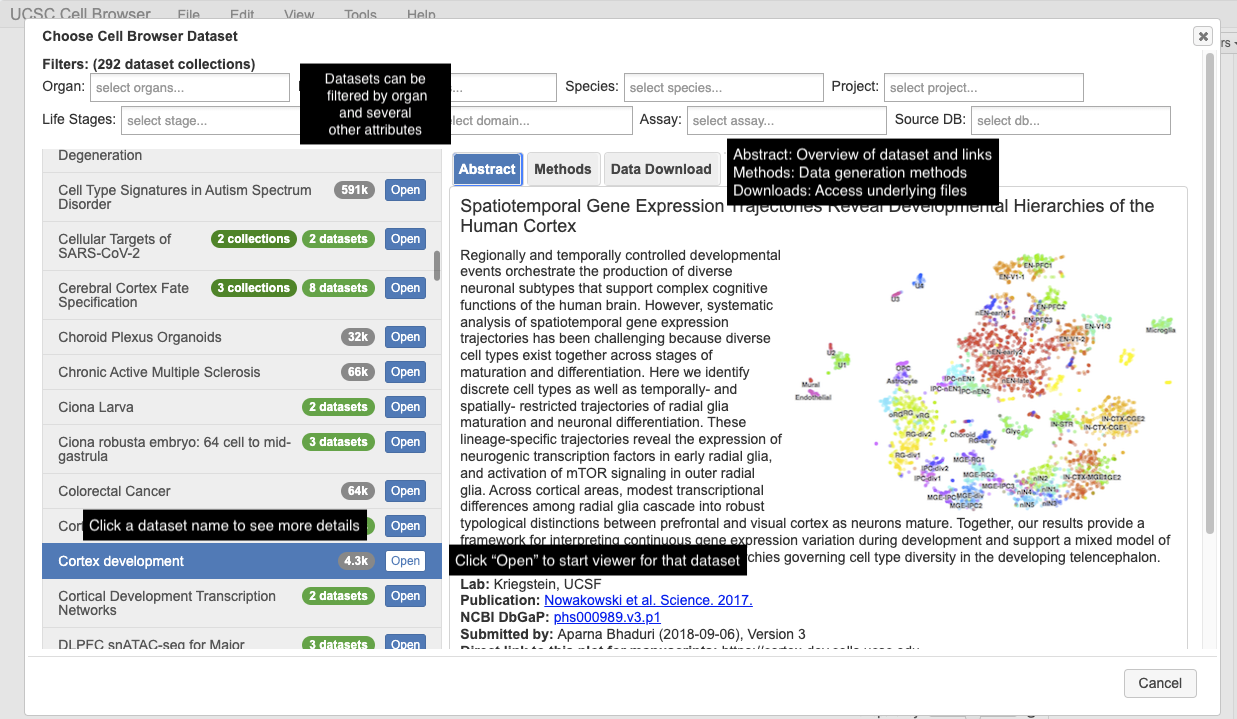
The dataset selection screen is the first thing you see when visiting cells.ucsc.edu.
Dataset List
Available datasets are listed on the left side of the screen. If the Cell Browser instance supports filtering, you can narrow the list by organ (e.g. brain, kidney), organism, disease, or project using the filter buttons above the list.
Dataset Information
When you click on a dataset name, information appears on the right side of the screen in three tabs:
- Abstract
A short description of the dataset, typically the abstract of the associated paper, with links to the publication, GEO accession, or other related resources.
- Methods
A brief description of the experimental and computational methods used to generate the dataset.
- Data Download
Links to download the underlying data files (expression matrix, metadata, coordinates) for use in your own analysis. See Downloading Data for details.
Opening a Dataset
Click the Open button (or double-click the dataset name) to load
the interactive visualization. The URL will update to include a ds=
parameter identifying the dataset — you can bookmark or share this URL
to link directly to a specific dataset.
Dataset Collections
Some datasets are organized into collections (e.g., a multi-region brain atlas). When you open a collection, you can navigate between member datasets using the top toolbar.